
I used to think that looking professional on camera meant investing in one of those expensive, ring-light-wielding setups that take up half my tiny apartment. Honestly? That’s a total scam. I spent way too much time spiraling because I didn’t have a studio-grade lighting kit, only to realize that most of us are just trying to survive a Tuesday without looking like a haggard ghost in the Zoom lobby. If you’re tired of searching for “how to look better on video calls” only to find tutorials for people with professional studios and zero responsibilities, I get it.
I’m not here to sell you a lifestyle overhaul or a new webcam. Instead, I’m sharing the low-effort, high-impact hacks I’ve actually used to look put-together when I’ve only had ten minutes to transition from “laundry mode” to “client mode.” We’re talking about zero-cost fixes—like using that one specific window in my living room or the strategic placement of a desk lamp—to help you look sharp without the unnecessary crisis management.
Mastering Your Professional Video Call Lighting Setup Fast
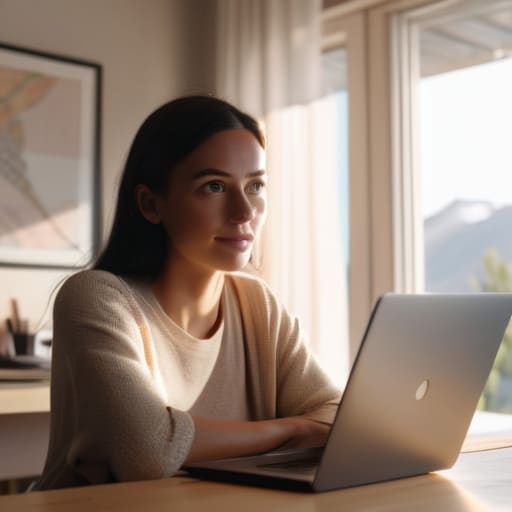
Look, you don’t need a studio-grade ring light or a professional production crew to stop looking like a shadowy figure from a low-budget horror movie. Most of the time, the fix is way simpler: stop fighting with your desk lamp and just face a window. Natural light is your best friend, but if you’re working late into the evening, grab a cheap floor lamp and position it slightly behind your monitor. The goal is to bounce that light toward your face, not have it coming from directly above you, which creates those weird, heavy shadows under your eyes that make you look like you haven’t slept since 2019.
If you’re serious about improving webcam video quality without spending a dime, try the “lamp hack.” Place two small lamps at 45-degree angles in front of you to soften the light. This creates a much more balanced, even glow that makes you look instantly more awake. Also, a quick pro-tip: if you’re using a laptop, prop it up on a stack of old cookbooks. Getting your camera at eye level is one of the easiest ways to nail the best camera angles for remote meetings, ensuring you aren’t spending the whole call staring down your own nostrils.
The Best Camera Angles for Remote Meetings That Save Sanity
Let’s be real: looking up at a camera sitting on your desk is a one-way ticket to looking like you’re perpetually staring at your own chin. It’s unflattering, it feels weirdly intimate in a bad way, and it’s definitely not the vibe we’re going for. To fix this, you need to stop the “laptop-on-the-table” default. Grab a stack of thick textbooks or a dedicated laptop stand to get that lens at eye level. When the camera is level with your gaze, you actually look like you’re engaging with your team rather than looming over them like a digital gargoyle.
If you’re still struggling with the framing, remember that less is more. You don’t need a cinematic wide shot; just aim for a medium close-up that shows your head and shoulders with a little bit of breathing room above your hair. Finding the best camera angles for remote meetings is really just about finding the sweet spot where you look composed and centered. Once you nail the height, you can stop fidgeting with your screen every five minutes and actually focus on the meeting instead of your own reflection.
The "I Actually Woke Up Today" Quick Fixes
- Stop relying on that heavy-duty blur filter to hide your messy room; it looks glitchy and distracting. Instead, just grab a neutral-colored sheet or a clean, minimalist bookshelf to sit behind you. If your space is a disaster zone, a simple, tidy corner is way more professional than a digital blur that makes your ears disappear every time you move.
- Ditch the overhead ceiling light—it’s basically a spotlight for your dark eye circles. If you don’t have a ring light, just grab a small desk lamp, take the shade off, and point it toward the wall in front of you. The reflected light is way softer on your skin and keeps you from looking like you’re starring in a noir film.
- Check your background for “head growth.” If you have a tall plant or a lamp directly behind your head, it creates this weird halo effect that makes your silhouette look messy. Shift your chair a few inches to the left or right so there’s some “breathing room” between your head and whatever is behind you. It makes the whole frame feel way less claustrophobic.
The TL;DR on Looking Human on Camera
Stop overthinking the tech; if you have a window and your laptop is at eye level, you’re already ahead of 90% of people.
Focus on one “anchor” (like decent lighting or a clean background) rather than trying to build a professional studio in your bedroom.
Stop Stressing the Screen
Look, at the end of the day, you don’t need a studio-grade lighting rig or a professional cinematographer to pull this off. It really just comes down to a few low-effort, high-impact tweaks: facing a window so you don’t look like a shadow, propping your laptop up on a stack of books to fix that awkward chin-up angle, and making sure your background doesn’t look like a laundry pile exploded. Once you nail these basics, you can stop worrying about your reflection and actually focus on the conversation. It’s about minimizing the friction between you and your work so you can just show up and be present.
If you’re still feeling a little self-conscious, just remember that everyone else on that call is probably also struggling with their WiFi or wondering if they have spinach in their teeth. We are all just out here doing our best in a digital world. Don’t let a bad camera angle rob you of your confidence. You’ve got the tools, you’ve got the hacks, and now you’ve got the setup. Now, go crush that meeting.
Frequently Asked Questions
What do I do if my apartment has zero natural light and I can't afford a fancy ring light?
Look, I’ve lived in a literal cave-apartment, so I get it. If you can’t afford a ring light and your windows are basically just wall decorations, don’t panic. Grab a cheap desk lamp, take off the shade, and aim it at the wall behind your laptop. It bounces the light back onto your face softly so you don’t look like a shadowy figure in a horror movie. It’s low-effort, zero-cost, and actually works.
How can I hide a messy, distracting background without actually cleaning my entire room?
Look, I get it. Sometimes the “organized chaos” of your room is actually just… chaos. If you don’t have the energy for a deep clean, lean into the tech. Use a subtle blur filter—it looks more natural than those fake tropical beach backgrounds that make you look like a floating head. If that’s too much, just reposition your desk to face a blank wall. Minimalist vibes, zero effort, and no one sees the laundry pile.

